
Zwift added Watt Lock in game update 1.124, which started rolling out on 20 October. Back in September, in my Zwift Ride V2 post, I said it wasn't a tool for pacer rides. A RoboPacer group speeds up and slows down with the road, and a fixed number can't follow it. I hadn't ridden it then, so that was a guess.
On Friday I tested the guess: an hour with Coco, three different power targets, and every block saved as its own split. The guess was mostly right. The numbers also turned up something I didn't expect about the calculator on this site, which I'll get to.
What Watt Lock does
Watt Lock switches your smart trainer out of Sim mode, where the resistance follows the gradient, and into ERG mode, where the trainer holds whatever power you set. Until now the only way to get ERG on Zwift was to load a structured workout. Now it's a button on the Action Bar.
The details, from Zwift's announcement:
- You need a trainer that supports ERG mode, and you have to be pedalling at 50 W or more to switch it on. Below that, the button greys out and tells you so.
- It lives on the Action Bar, in the game or in Zwift Companion. Once it's on, the button changes to Watt Unlock and two new buttons appear beside it. The target moves 1 W at a time, from those buttons, the + and − keys, or the shift buttons on Zwift's controllers.
- You can use it in free rides, RoboPacer rides, meetups, group rides and fondos. Races, workouts, group workouts and time trials are off limits.
- It turns itself off if your cadence drops below 25 rpm, or if you stop pedalling at a Coffee Stop. When it goes off you're dropped into a default virtual gear rather than the one you were in, which Zwift says a later update will fix.
- It stays on when you teleport. That turned out to matter.
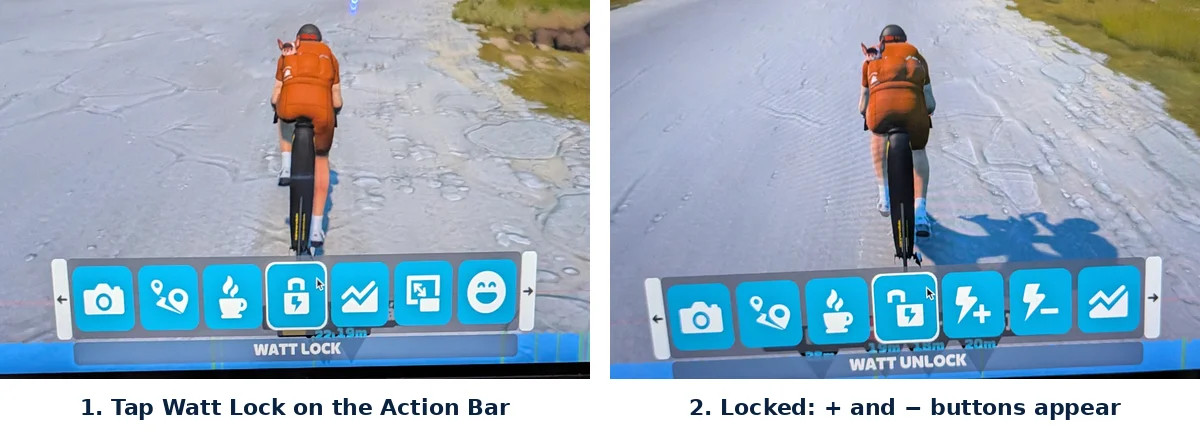
Switching it on. Once you're locked, the + and − buttons next to Watt Unlock nudge the target 1 W at a time.
My first go was on a Tour of Watopia stage earlier in the week, and it did what it says. My power stayed flat, I stayed in the zone I wanted, and the lumps in the road stopped dragging me above it. It was also a bit boring. With the trainer holding one number there's nothing making you change position or get out of the saddle, and after a while I was less comfortable on the bike than usual. Terrain gives you variety you don't notice until it's gone.
The test
Coco rides at 2.6 W/kg. At 73.6 kg, the calculator puts my number at 191 W. Switch on the "In the Bunch" option and it takes 25% off for the draft, which gives 144 W.
Friday's route for Coco was Triple Flat Loops: 34 km with 157 m of climbing. That's flat by Watopia standards, but there are short ramps on it, and they matter.
I rode three blocks of about 15 minutes and pressed Tab between them. Zwift calls this New Split, and it drops a lap marker into the ride file.
- No Watt Lock. Ride with Coco the normal way and see what it costs.
- Watt Lock at 191 W, the calculator number.
- Watt Lock at 144 W, the bunch number.
What happened
Unlocked, I averaged 179 W and stayed with the group the whole time. On the flat that was about 176 W. On the ramps I went up to around 208 W without really thinking about it, which is what you do when you're following wheels.
Locked at 191 W, I spent the flat sections drifting forward through a group of 6 to 12 riders until I was on the front. Then the road went up, my power stayed at 191, and I slid back through the bunch. Back on the flat, back to the front. The second ramp put me off the back for good, and I rode the last five minutes or so on my own. My speed on the flat in this block was 36.7 km/h. Unlocked, at 15 W less, it had been 37.8 km/h. Sitting on the front costs you.

Ninety seconds into the 191 W block. Watt Lock is on (top left), the split for my unlocked block reads 178 W, and I'm still in Coco's group. For now.
Locked at 144 W lasted less than a minute. I was in the bunch, and then I wasn't. I pushed the target up to 210 W and held it for about six minutes, and the gap to Coco stayed at about 41 seconds the whole way. Out of the draft, 210 W only matched the group's speed. It didn't close anything.
So I teleported back to Coco. Watt Lock stayed on, though the Drops multiplier reset. Then I tried something I hadn't planned: lock, and nudge the target up whenever I started to slip. In a bigger group of 20 to 25 riders I held on at about 155 W for a few minutes. The first ramp dropped me, and I needed 230 W to get back on. After that I settled at about 178 W and stayed in the bunch.

My power for the hour, with the route gradient underneath. The flat line in the 191 W block is Watt Lock doing its job, including on the ramps where everyone else went harder.
What the numbers say
The figure I keep coming back to is 178. Riding with Coco unlocked cost me 179 W on average. Riding with Coco locked, with a thumb on the + button, settled at 178 W. Two different ways of riding landed in the same place, so I trust it more than any one block. It's about 93% of the calculator's 191 W.
That means on this ride the draft was worth about 7%, not the 25% the bunch option assumes. The 144 W figure didn't keep me in either group, the small one or the big one.
The 155 W stretch is the odd one out. It wasn't downhill: the gradient was flat and my speed matched the later section at 178 W. My best guess is that I was tucked deeper into the bunch for those few minutes, but I can't prove that from the ride file.
Find your number for Coco
Start from the calculator figure for your weight. On this ride, a few percent under it kept me in the bunch on the flat.
⚡ Open the CalculatorWhat this means for the calculator
I'm not changing the bunch option on the strength of one ride. This was one pacer on one route, and group size clearly moves the number around. But I'm not going to pretend the result agreed with the tool either.
I'll repeat the test with a different pacer, and on a hillier route once the guest worlds come back in November, before I touch the maths. If the draft keeps coming out nearer 10% than 25%, the calculator will change, and I'll say so here.
So should you use Watt Lock with a RoboPacer?
Not as set and forget. Lock at the calculator number and you end up on the front on the flat and off the back on the ramps. Lock lower and you get dropped sooner. Once you're off the back, Watt Lock won't get you back on. Teleporting will, but it costs you the Drops multiplier.
If you want to try it anyway, lock a little under your calculator figure and keep a thumb on the shift button. Add 20 to 30 W as soon as the road tilts up, before you start sliding back, and take it off again at the top. By then you're doing by hand what Sim mode does for you anyway, which is why I've gone back to riding Coco unlocked.
Watt Lock is good on the rides where nobody is setting the pace but you: a steady zone 2 hour, or a warm-up before you join a pacer. That's what it was built for, and on the Tour of Watopia stage it did that well. Pick a route you like looking at, though, because it won't give you much else to think about.